

Bring your own model (BYOM) means registering, importing, or pointing a platform at a model artifact or API key so your application runs on infrastructure you control instead of a vendor's default. The right first move is packaging your model as an OCI or tar.gz artifact, or preparing a BYOK key, and running the platform's own import validation before you wire it into production. Azure AI Foundry and Amazon Bedrock support versions of this pattern, each with its own required file formats.
TL;DR:
- Packaging your model with the correct format, manifest, and files is crucial to avoid import failures and ensure smooth deployment.
- Runtime compatibility requires verifying hardware needs, endpoint URL shape, and proper registry addressing, especially for GPU-only or specific path requirements.
- For high privacy, low latency, or high-volume applications, local hosting often becomes more cost-effective and secure than relying on API calls.
- Implementing a hybrid routing system that directs routine, high-volume tasks locally while escalating complex requests to an API optimizes performance and costs.
- Regularly testing, versioning, and planning rollbacks are essential to maintaining deployment stability and preventing errors during model updates.
Table of Contents
- What "Bring Your Own Model" Means and When to Choose It
- Integration Patterns: Register, Import, or Point a Platform at Your Model
- Packaging and Deployment Checklist for a BYO Model
- Supported Runtimes and Common Platform Limitations to Watch For
- Deciding Between Local and Cloud: A Practical Framework
- Adrian Labs' Take on Practical BYOM Workflows
- Security Best Practices for BYOM Deployment
- Monitoring and Observability of Deployed Models
- Versioning and Updating Deployed Models Without Breaking Production
- Cost Estimation and Optimization for BYOM Across Platforms
- Common Pitfalls and Troubleshooting Tips During BYOM Integration
- What the Conventional BYOM Advice Gets Wrong
- Bring Your Own Model with Adrian Labs
- Sources
What "Bring Your Own Model" Means and When to Choose It
BYOM lets you swap a platform's default model for one you trained, fine tuned, or licensed yourself, then run it through that platform's inference stack. Some documentation calls the credential-only version of this "bring your own key," or BYOK: instead of uploading a model artifact, you hand the platform an API key that points to your own hosted endpoint. The distinction matters. BYOM usually means shipping weights; BYOK usually means routing calls through your own account.
The trade-off against calling a cloud API directly comes down to three things: privacy, latency, and cost at scale. A hosted API is faster to start with, but every prompt leaves your network. BYOM keeps sensitive data local and gives you predictable per-token economics once you clear the hardware break-even point.
BYOM tends to make sense when:
- You process regulated data (health records, financial documents, legal filings) that can't leave your infrastructure.
- You need sub-100ms response times that a network round trip to a third-party API can't guarantee.
- Your token volume is high enough that local hosting undercuts API billing over time.
- You've fine-tuned a model on proprietary data and the value is in that customization, not a generic foundation model.
Integration Patterns: Register, Import, or Point a Platform at Your Model
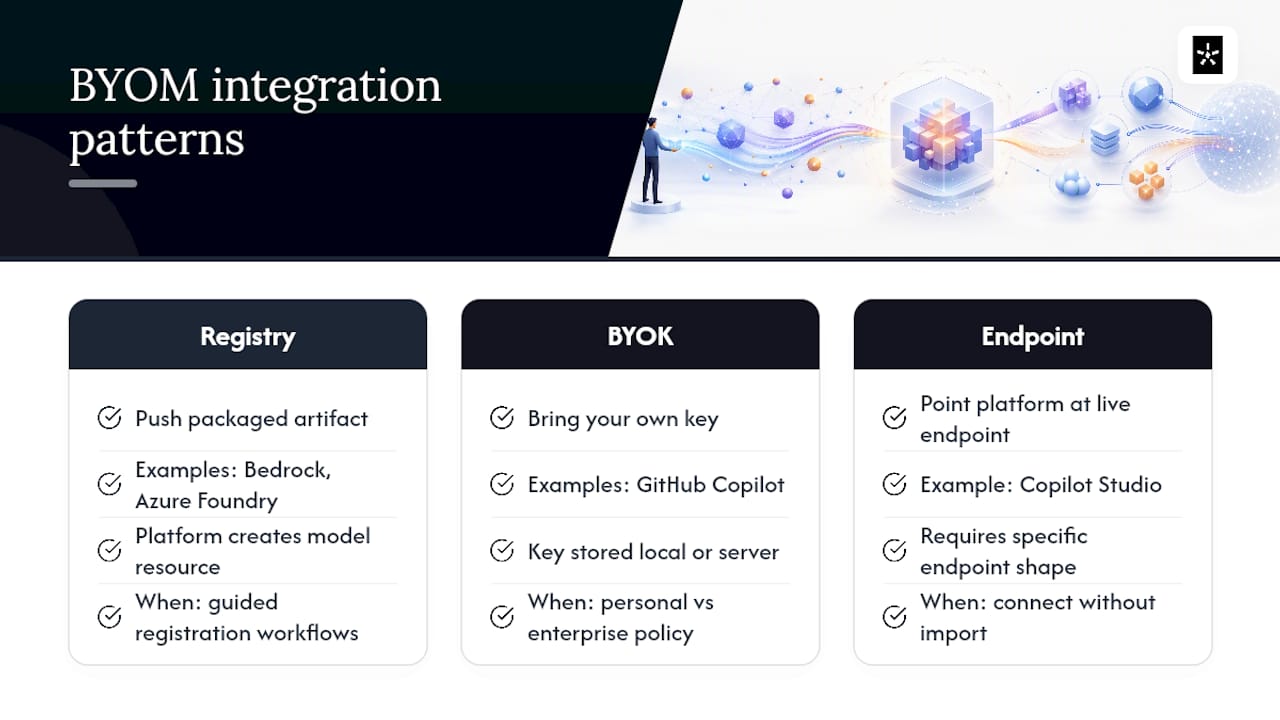
Every major platform funnels BYOM into one of three flows, and knowing which one you're dealing with saves you a lot of failed deployments.
1. Registry and import flows. You push a packaged model artifact to a container registry or object store, then the platform creates a model resource that references it. Amazon Bedrock's Custom Model Import works this way: you import a customized model from S3 or SageMaker, and Bedrock exposes it through the same unified API as its base models, with a guided console workflow handling the registration step. Azure AI Foundry follows a similar pattern, packaging models as OCI artifacts pushed to a registry, then referencing that registry from a deployment definition, according to its BYO models documentation.
2. BYOK flows, local or enterprise. GitHub Copilot splits this into two distinct paths. Local BYOK stores your key client-side, ideal for solo developers or air-gapped environments. Enterprise BYOK is registered server-side and governed by organization policy, letting an admin enable or disable it across a whole team, per GitHub's Copilot BYOK docs. Pick local for a quick personal setup; pick enterprise when compliance or centralized key rotation matters.
3. Direct endpoint connections. Some platforms skip import entirely and just ask you to point at a live endpoint. Microsoft Copilot Studio connects to Azure AI Foundry models by taking a model deployment name and base model name, and it requires that endpoint to end in /chat/completions, a specific shape not every custom deployment satisfies by default, according to Microsoft's own documentation. Note that newer model families like GPT-5 and above aren't yet supported for BYOM inside Copilot Studio prompts, so check compatibility before you build around it.
Packaging and Deployment Checklist for a BYO Model
Most BYOM failures happen before the model ever runs a single inference. Get the packaging right first.
Supported artifact types vary by platform, but three formats show up repeatedly: safetensors for weight storage, ONNX for portable inference graphs, and plain tar.gz bundles for OCI-style pushes. DigitalOcean's inference import, for example, requires specific file formats like safetensors and restricts uploads to inference-compatible model architectures such as Qwen2ForCausalLM, according to DigitalOcean's import documentation. Alongside the weights, bundle a model config file, the tokenizer, and a metadata manifest. Skipping the manifest is one of the most common reasons a clean model fails validation on the first try.
Here's the sequence that works across most platforms:
- Assemble your files. Weights, tokenizer, config, and manifest in one directory.
- Package the bundle. Compress as tar.gz or structure as an OCI artifact, depending on the target registry.
- Push to a registry or object store. Azure uses container registries; Bedrock pulls from S3 or SageMaker.
- Create the deployment definition. Reference the pushed artifact from a ModelDeployment resource or equivalent.
- Run validation. Most platforms run an automatic schema check on import. Watch for manifest field errors here.
- Smoke test. Send a warmup request, check cold-start latency, run a few simple prompts, and confirm tokenization output matches what you expect locally.
Pro Tip: Test your packaged artifact by extracting it in a clean container before you push it anywhere. A surprising number of "failed import" errors trace back to a missing config file that only shows up once the archive is unpacked outside your original build environment.
Once the smoke test passes, run a short latency benchmark under realistic concurrency and a basic auth and role check to confirm the deployment only responds to credentials it should.
Supported Runtimes and Common Platform Limitations to Watch For
Runtime mismatches cause more BYOM headaches than packaging errors do. A few constraints come up again and again across platforms:
- GPU-only runtimes. vLLM deployments specifically require a GPU; there's no CPU fallback path documented for that runtime on Azure AI Foundry.
- CPU-capable alternatives. ONNX runtime (sometimes paired with onnx-genai for generative workloads) supports both CPU and GPU execution, making it the more portable choice for cost-constrained deployments.
- Endpoint shape requirements. Copilot Studio insists on a
/chat/completionsendpoint suffix specifically. An inference endpoint that returns the right JSON but uses a different URL pattern will fail connection, not inference. - Registry URL formatting. Don't point deployments at raw IP addresses for your registry; most platforms expect a resolvable hostname and will reject or silently fail on IP-based references.
- Manifest field gaps. A missing required field in the manifest, not a bad model file, is the most frequent reason for import failure.
One useful signal for anticipating these limits: architecture restrictions are common but narrow. DigitalOcean's list of supported inference architectures covers popular families like Qwen2ForCausalLM, but a model outside that list gets rejected at import, not at runtime, which at least saves you a wasted deployment cycle.
Deciding Between Local and Cloud: A Practical Framework
Run through this checklist in order, and stop at the first factor that gives you a clear answer.
- Privacy first. If the data can't leave your network under any circumstance, local hosting wins regardless of every other factor.
- Context length second. If your use case needs a context window your local hardware can't hold efficiently, a cloud API becomes the practical answer.
- Quality third. Does a local model actually hit the accuracy bar for this task, or does it need frontier-level reasoning?
- Latency fourth. Sub-100ms requirements usually rule out remote network hops.
- Cost last. At high token volumes, local hosting tends to become cheaper once you amortize hardware, though the exact break-even point depends on your workload and hardware choices, per cost analysis modeling from SitePoint.
Most production systems don't pick one side. They route. A lightweight classifier looks at each incoming request, and simple, high-volume tasks (extraction, classification, formatting) go to a local model while complex reasoning gets escalated to a cloud API, a pattern described in hybrid routing guidance from HybridLLM.dev. This keeps sensitive or repetitive work off the network entirely while reserving API spend for the requests that actually need it.
Pro Tip: Build the router before you build the fallback logic. A classifier that misroutes a request to the wrong model is a smaller problem than an API outage with no local backup path at all.
Revisit this split quarterly. Local model quality moves fast enough that a task you routed to the cloud six months ago might run fine on your own hardware today.
Adrian Labs' Take on Practical BYOM Workflows
One platform supports a version of BYOM directly in its desktop app: run a local model for building and testing, or bring your own API key instead of using hosted credits. That mirrors the local-first pattern described above, and it's the same reasoning covered in Adrianlabs's breakdown of running an AI app builder locally. For a closer look at what BYOK actually costs versus hosted usage, the cost comparison on the Adrianlabs blog walks through the numbers developers ask about most.
Security Best Practices for BYOM Deployment
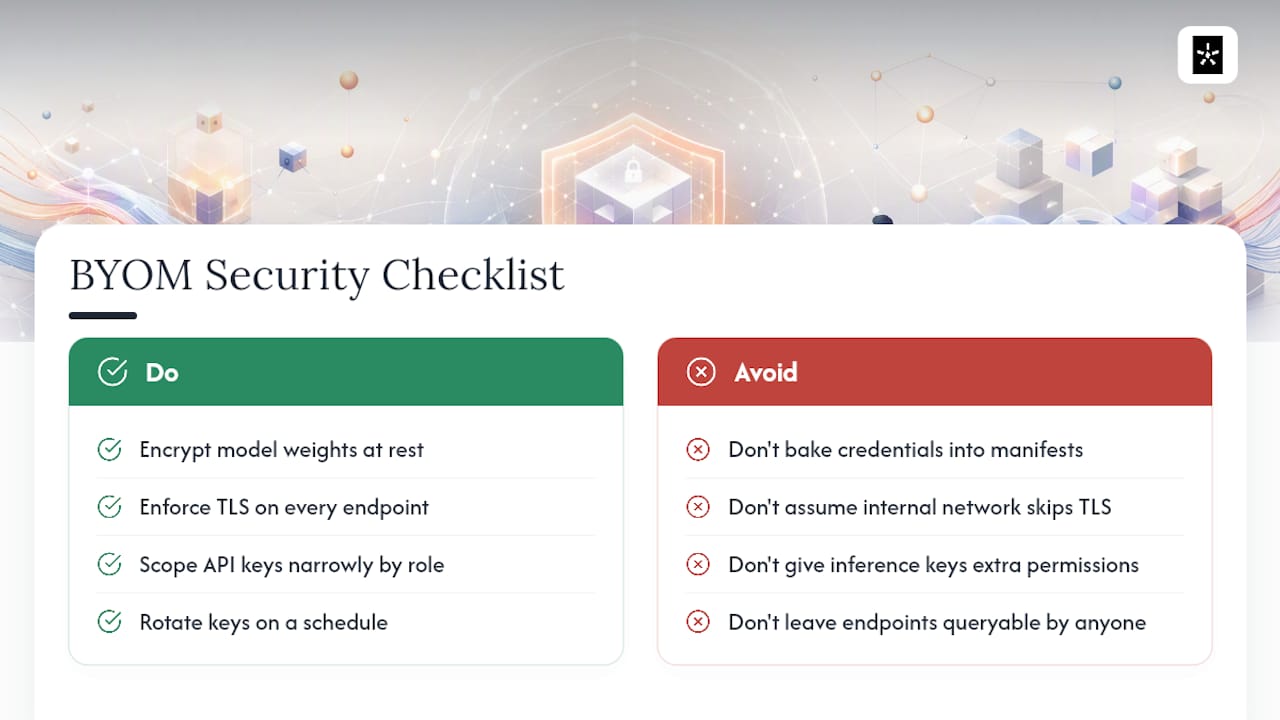
A model artifact sitting in a registry is a target, not just infrastructure. Encrypt weights at rest, whether that's registry-level encryption or a separate encrypted volume, especially for any model fine-tuned on proprietary or regulated data. In transit, confirm every endpoint, whether it's an inference endpoint or a chat/completions path, enforces TLS. Don't assume an internal network segment makes that optional.
Access control deserves the same rigor you'd apply to a production database, not an afterthought bolted on after deployment. Scope API keys narrowly: a key used for inference shouldn't also carry permissions to modify the deployment or read other resources in the same registry. Enterprise BYOK setups, as GitHub structures them, separate server-side key registration from client access specifically so an organization can revoke or rotate credentials without touching every developer's local environment.
Two practices catch most avoidable incidents. First, never bake credentials into the model manifest or config files you push to a registry. Second, rotate keys on a schedule rather than only after a suspected leak. If your platform supports role-based access on the deployment resource itself, use it. A model endpoint that anyone with network access can query is a bigger liability than most teams admit until something goes wrong.
Monitoring and Observability of Deployed Models
Once a custom model is live, the questions that matter shift from "does it work" to "is it still working correctly." That requires three categories of visibility: performance, logs, and alerts.
Track latency percentiles, not just averages. A model with a fine p50 but a bad p99 will frustrate a subset of users while your dashboards look healthy. Watch token throughput and error rates per endpoint, especially after any change to the underlying hardware or runtime version.
Logging needs to capture enough context to debug a bad response without capturing sensitive input data you're not supposed to retain. Log the request shape, timing, and model version. Be more careful with the actual prompt or response content, particularly if the reason you chose BYOM in the first place was data privacy.
Alerting should trigger on drift, not just downtime. A model that returns malformed JSON at twice its usual rate is a real signal even if the endpoint is technically up. Set thresholds on latency spikes, error rate increases, and unusual output patterns, and route those alerts somewhere a human actually checks, not into a channel nobody reads.
Versioning and Updating Deployed Models Without Breaking Production
Every model update is a deployment risk, and the fix is the same one that works for application code: never replace a live version in place.
Tag every deployed artifact with a version identifier tied to its manifest, so you can trace exactly which weights and config produced a given response. When you're ready to update, deploy the new version alongside the old one rather than overwriting it.
Canary releases work well here. Route a small percentage of traffic, often starting around 5%, to the new model version while the rest keeps hitting the known-good deployment. Watch the same latency and error metrics you already track, and only widen the rollout once the canary holds steady over a meaningful traffic sample.
Keep a rollback path ready before you need it, not after. That means the previous version's artifact and deployment definition stay available and testable, not deleted the moment a new one goes live. If a canary shows regressions in output quality or a spike in latency, rolling back should be a configuration change, not a re-deployment from scratch.
Cost Estimation and Optimization for BYOM Across Platforms
Cost modeling for BYOM differs from cloud API billing in one fundamental way: you're paying for infrastructure whether you use it or not, instead of paying per call.
The break-even point between local hosting and API calls depends heavily on token volume and how efficiently you can amortize hardware costs over time, and that crossover shifts depending on your specific workload and hardware choices, according to total cost of ownership modeling from SitePoint. Below that volume, API billing usually wins on simplicity and total spend. Above it, local hosting starts to pull ahead, assuming your utilization stays high enough to justify the hardware sitting idle between requests.
A few optimization levers apply across nearly every platform: batch requests where latency requirements allow it, right size your GPU or CPU allocation instead of over provisioning for peak load, and use quantized model variants where accuracy loss is acceptable, since a quantized model often runs meaningfully cheaper per token. Managed import services like Bedrock's Custom Model Import reduce operational overhead compared to running your own inference cluster, but they also remove some of the fine-grained cost control that self-hosting gives you. Weigh that trade-off against your team's actual capacity to run infrastructure, not against a theoretical ideal.
Common Pitfalls and Troubleshooting Tips During BYOM Integration
Most BYOM failures trace back to a small set of recurring mistakes.
Missing or malformed manifest fields cause more failed imports than any actual model problem. Before you file a support ticket, extract your packaged artifact in a clean environment and confirm every required config field is present.
Endpoint shape mismatches trip up integrations that otherwise work fine. If a platform expects a /chat/completions suffix and your endpoint returns correct responses at a different path, the connection will fail before inference even runs.
Runtime and hardware mismatches show up late, often after a deployment succeeds but requests start failing. Confirm your runtime's GPU or CPU requirements before you provision infrastructure, not after.
Registry addressing errors, like referencing a raw IP instead of a resolvable hostname, cause silent failures that look like network issues rather than configuration problems.
Skipping the smoke test is the most avoidable pitfall on this list. A quick warmup request, a latency check, and a tokenization sanity test catch the majority of integration issues before they reach production traffic.
What the Conventional BYOM Advice Gets Wrong
Most BYOM guides treat the decision as binary: local or cloud, pick one. That framing doesn't survive contact with an actual production system. The teams getting real value from BYOM aren't the ones who moved everything local to save money or kept everything cloud based for simplicity. They're the ones running a router that sends routine, high-volume work to a local model and escalates genuinely hard reasoning to a frontier API.
The other place conventional advice falls short is packaging. Plenty of tutorials walk through the happy path, model trains cleanly, uploads cleanly, runs cleanly, and skips the manifest errors and endpoint shape mismatches that actually eat most integration time. If you take one thing from this playbook, prioritize the smoke test and the manifest check before you touch a decision framework. A well-reasoned local versus cloud strategy means nothing if your artifact fails import on a missing config field.
Start local, escalate deliberately, and revisit the split on a schedule instead of once and never again.
— Adrian
Bring Your Own Model with Adrian Labs
If you've read this far, you already know BYOM isn't one flow, it's a handful of platform-specific patterns you have to map to your own use case. One platform takes a more direct route: build your application with a local model or your own API key from the start, with no separate import pipeline to configure first.
The desktop app supports running local models for development and testing, or connecting your own API key instead of relying on hosted build credits, so the BYOM decision happens at setup, not after you've already committed to a platform's default. Every release goes through integrity verification, and users retain real ownership of the code generated rather than a black-box output tied to one vendor. For a closer look at how code ownership works in practice, read where your code actually goes when you build with Adrian. If you're ready to see the local-model and BYOK options firsthand, try Adrian and run your first build against your own model or key.